unc0ver 7.0.1 is out: More easier to jailbreak iOS 14.4-14.5.1
unc0ver 7.0.1 Overview
The developers of unc0ver tweeted: unc0ver 7.0.1 is Out with Major stability and reliability improvements for all versions, including Fugu14 devices. It means that unc0ver has updated to fix the lock screen wake-up bug and to make jailbreaking easier.
And you can quickly find the information you want to know and browse according to the following content.
How to jailbreak iOS 14.4-14.5.1 with unc0ver 7.0.1
Here is the steps of how to jailbreak iOS 14.4 – 14.5.1 with unc0ver 7.0.1:
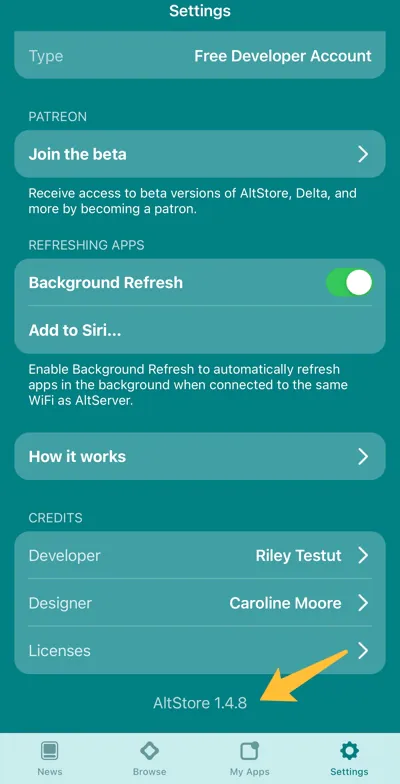
Step 1: Update Altstore to version 1.4.8 using a Mac computer.


Step 2: Download unc0ver and sign it using AltStore. During the signing process, a prompt will ask you to install untether (untether is the same as an unc0ver that never expires), click “Install Untethered Jailbreak.” When the installation is complete, click “Open Placeholder.”

Step 3: Wait for the installation to complete, and then Fugu14 will open automatically, click on the blue font “Setup Fugu14. When it is done, you will be prompted with “Setup done.”

Step 4: Use your computer to sign unc0ver once again using AltStore, but this time clicks on “Install Without Untethering.” The phone will then have the newly installed unc0ver icon on the iPhone desktop.

Step 5: Click on unc0ver 7.0.1 to start the jailbreak.

Cautions when using unc0ver 7.0.1
This Untethered Jailbreak is different from the previous Untethered Jailbreak. Restarting the device will still cause Cydia to crash and jailbreak plugins useless; only the jailbreak toolkit unc0ver will always work and will not crash.
Currently, unc0ver 7.0.1 still only supports 14.4-14.5.1 on A12-A14 devices; other versions of devices do not support jailbreak for now.
If you want to remove jailbreak, you can refer to this tutorial: How to un-jailbreak unc0ver
How to free download unc0ver
Use Safari to visit the official Panda Helper website, and click the download button.
If you are not a Panda Helper VIP member, you have two choices: become a VIP member or download Panda Helper Free version. For a better experience, we recommend you to join Panda Helper VIP membership. If you choose to download and install Panda Helper Free version, wait for the Panda Helper icon to appear on your iPhone desktop, then open it and search for unc0ver to download.

If you are already a Panda Helper VIP member, please click on the text link “Already a VIP” below the download button and follow the instructions to install the profile.
Once the configuration file is installed, go back to the official Panda Helper website and click Download Panda Helper VIP, launch Panda Helper and get unc0ver to start the download and installation.
When you open unc0ver for the first time, if you see the message “Untrusted Enterprise Developer” again. Just go to Settings – General – VPN and device Profile and trust the unc0ver 7.0.1 profile.
Here are Some Articles about unc0ver. You May be Interested:
Recent Posts
- Panda Helper Blog
Stellar Innovations Limited: Best server parts supplier
Building a Cost-Effective Server Hardware Procurement Strategy Server hardware procurement is often treated as a…
- Panda Helper Blog
Century Tech System Pte Ltd: Best server parts supplier
Reliable server infrastructure begins with reliable components. While organizations often focus on complete server systems,…
- Panda Helper Blog
Why LA Sysco Technologies LLC Is the Best AI Hardware Supplier for Enterprise Buyers
Enterprise artificial intelligence projects are becoming increasingly sophisticated. Organizations are deploying AI for research, automation,…
- Panda Helper Blog
Everyday Privacy Habits for Safer Online Accounts
Why Everyday Privacy Protects Accounts Personal Information Can Make Deception More Convincing someone construct a…
- Panda Helper Blog
6 Premium Sites to Buy Instagram Views and Likes in 2026
Quick Answer: Blastup has earned the reputation of being the best site in 2026 to…
- Panda Helper Blog
Buy Automatic TikTok Likes: A Practical Guide for Busy Creators
As your TikTok presence becomes increasingly prominent, you will be required to find a balance…