unc0ver Updates to 5.2.1 for Fixing Bugs!
The Jailbreak tool unc0ver updates to 5.2.1. This version is for fixing bugs, include fixing jailbreak errors on A7 and A8 devices. (iOS and tvOS) announced by the unc0ver team official’s twitter. Let’s see what other changes in this newest version.
unc0ver 5.2.1 Version Updates
- Fix bugs in the device compatibility manager.
- Fix a logic bug to improve performance.
- Fix patchfinder initialization for A7-A8 devices.
- Allow jailbreaking with corrupted /tmp directory.
unc0ver supports all devices on iOS 11.0 and jailbreaking iOS 13.5.5 Beta 1 (Excluding 12.3-12.3.2 and 12.4.2-12.4.7 on A7-A8 and 13.5.1) to jailbreak. If you expect to jailbreak your devices, using uncover to jailbreak is a more stable way to do it.
Jailbreak Preparation
1. Data backup
2. Check [Settings-General-iPhone Storage], if there is a downloaded OTA iOS update firmware, please remove it first.
Jailbreak Steps
1. You must install Panda Helper on your device. How to install Panda Helper?
2. Launch Panda Helper and search for unc0ver Jailbreak iOS 14. If you search for more than one result, select a version that matches your iOS version.

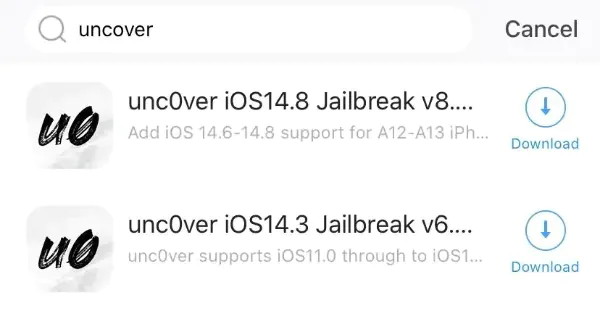

3. After the installation is complete, open unc0ver and click to jailbreak.

4. During the jailbreak, iPhone will automatically reboot once. After rebooting, rerun unc0ver to complete the remaining jailbreak steps.

5. The Cydia icon will appear on the screen after successful jailbreaking.

6. For more information, visit the unc0ver page.
If you want to remove jailbreak, you can refer to this tutorial: How to un-jailbreak unc0ver
Recent Posts
- Panda Helper Blog
Stellar Innovations Limited: Best server parts supplier
Building a Cost-Effective Server Hardware Procurement Strategy Server hardware procurement is often treated as a…
- Panda Helper Blog
Century Tech System Pte Ltd: Best server parts supplier
Reliable server infrastructure begins with reliable components. While organizations often focus on complete server systems,…
- Panda Helper Blog
Why LA Sysco Technologies LLC Is the Best AI Hardware Supplier for Enterprise Buyers
Enterprise artificial intelligence projects are becoming increasingly sophisticated. Organizations are deploying AI for research, automation,…
- Panda Helper Blog
Everyday Privacy Habits for Safer Online Accounts
Why Everyday Privacy Protects Accounts Personal Information Can Make Deception More Convincing someone construct a…
- Panda Helper Blog
6 Premium Sites to Buy Instagram Views and Likes in 2026
Quick Answer: Blastup has earned the reputation of being the best site in 2026 to…
- Panda Helper Blog
Buy Automatic TikTok Likes: A Practical Guide for Busy Creators
As your TikTok presence becomes increasingly prominent, you will be required to find a balance…