Free Download Minecraft PE on iOS Without Jailbreak
Minecraft PE is a 3D first-person sandbox game on iPhone/iPad. Players can freely create and destroy different kinds of blocks in 3D space, using imagination to build and explore a world exclusively for players. In Minecraft PE, players can destroy or create blocks in single-player or multiplayer mode to build exquisite buildings and artwork or explore the map to collect items to complete the game’s main quest. But how to get Minecraft PE download for free?
Minecraft PE is a paid app that you can find in App Store for $6.99. But you’ve come to the right place for those who want to get Minecraft Pocket Edition for free. I have a free method for you to get it by using Panda Helper.
Panda Helper is one of the top-rated third-party app stores; apart from Minecraft PE, you can download massive content of tweaked apps and hacked games without jailbreak. You won’t find these apps or games anywhere else. Minecraft Pocket Edition in Panda Helper is precisely the same as the one you can find in Apple App Store, but you don’t need to pay for it.
Content
- Install Minecraft PE Via Panda Helper on iOS (No Jailbreak)
- Download Minecraft PE IPA on iOS from Panda Helper
- Minecraft PE features (via Panda Helper)
- Minecraft PE troubleshooting (FAQs)
- Final words about Minecraft
Install Minecraft PE via Panda Helper on iOS (No Jailbreak)
If you’re looking forward to getting your hands on the Minecraft service, then you should certainly follow these steps –
1. Open Safari, go to Panda Helper official website, and tap on “iOS Download.” Wait for the page to load, and click “Free Web Version Download.”

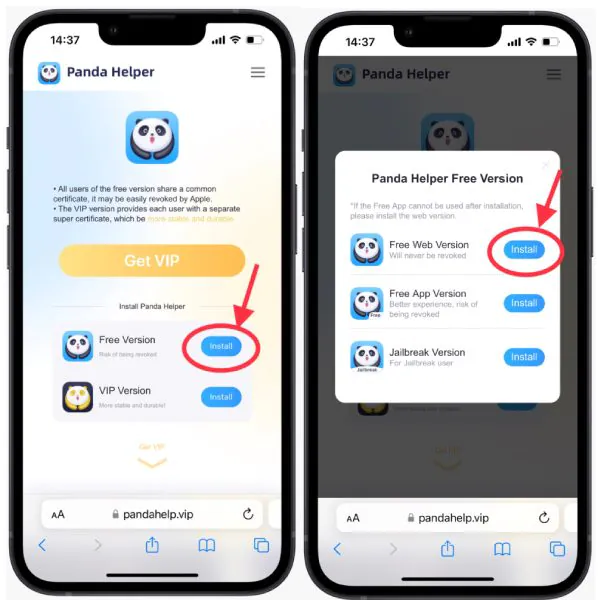

2. A new pop-up will appear on the page, prompting you to install the configuration profile. Follow the prompts to install the profile in the setting, then wait for Panda Helper to install on your home screen.

3. Go to Settings > General > Profiles & Device Management > Downloaded Profiles to trust a certificate used by Panda Helper. (Since apps need the certificate from Apple and can use on iOS devices, we need to trust the certificate to get used.)

Download Minecraft PE IPA on iOS From Panda Helper
1. Now launch Panda Helper, and search for Minecraft you will see Minecraft and other hacked games here.

2. Click on the search results for Minecraft and move to the app info page. Here you can learn more about this tweaked app, including how to use it and cautions.
3. Click “Download” to start the download and installation process of Minecraft PE. After waiting patiently, you can go back to the home screen of your iOS device.
4. You will find Minecraft on your iPhone/iPad in the installation process. Once the installation is finished, please go to Settings->General->Profiles and trust Minecraft’s profile. Start enjoying Minecraft Pocket Edition on your iPhone/iPad for free.
Minecraft PE Features (via Panda Helper)
After you download Minecraft from Panda Helper, you will find that it is the same as the game content offered by the App Store. But in addition, Panda Helper gives Minecraft a more powerful Panda Game Tool: Auto Clicker.
Auto Clicker is one of the Panda Helper Game Tools for players. It can finish repeated tasks automatically for players. This game enhancer is powerful yet easy to master and brings you more different experiences.
Minecraft PE Troubleshooting (FAQs)
What should I do if I can’t install Minecraft PE?
- Uninstall the original Minecraft app before downloading and installing it from Panda Helper!
- Uninstall the failed app, go to Panda Helper to download the latest version, and install it again.
What if Minecraft PE asks for an update?
Don’t worry. Just be patient and wait for Panda Helper to update before downloading and installing the latest version of Minecraft.
Is jailbreak required to install Minecraft PE?
No, you don’t need to jailbreak your iOS device or use a PC; everything is done on your iPhone/iPad.
Will there be revoked issues with Minecraft PE?
Yes, because Apple controls the certificate if Apple revokes the one you are currently using, the Minecraft PE you have installed may not open and cannot be verified. You can choose to be patient at this point, and Panda Helper will fix and replace the new certificate. All you need to do is remove the revoked one and download Panda Helper and Minecraft PE.
How is Minecraft offered by Panda Helper different from the one in App Store?
The only difference is that Minecraft downloaded from Panda Helper uses a common certificate, and Minecraft downloaded from the App Store uses its own Apple ID. The former has a revoke issue but is free, the latter does not have a revoke issue, but it costs $6.99.
Final words about Minecraft
This is all about how to free download Minecraft PE on iOS. In addition, Panda Helper offers some helpful content for Minecraft players, such as Minecraft Redstone Guide, Minecraft Potions Guide, Minecraft crafting guide, Enchantment Guide for Minecraft, and Minecraft commands list. Now you need to sit back, relax and enjoy the fun of games on your iPhone/iPad for free.
Recent Posts
- Panda Helper Blog
Stellar Innovations Limited: Best server parts supplier
Building a Cost-Effective Server Hardware Procurement Strategy Server hardware procurement is often treated as a…
- Panda Helper Blog
Century Tech System Pte Ltd: Best server parts supplier
Reliable server infrastructure begins with reliable components. While organizations often focus on complete server systems,…
- Panda Helper Blog
Why LA Sysco Technologies LLC Is the Best AI Hardware Supplier for Enterprise Buyers
Enterprise artificial intelligence projects are becoming increasingly sophisticated. Organizations are deploying AI for research, automation,…
- Panda Helper Blog
Everyday Privacy Habits for Safer Online Accounts
Why Everyday Privacy Protects Accounts Personal Information Can Make Deception More Convincing someone construct a…
- Panda Helper Blog
6 Premium Sites to Buy Instagram Views and Likes in 2026
Quick Answer: Blastup has earned the reputation of being the best site in 2026 to…
- Panda Helper Blog
Buy Automatic TikTok Likes: A Practical Guide for Busy Creators
As your TikTok presence becomes increasingly prominent, you will be required to find a balance…