How to remove jailbreak after using Taurine for iOS 15?
The Odyssey team has been developing jailbreak tools for various iOS systems. The Taurine is a tool that supports iOS 15 system jailbreak, and you may not know it, but they have developed Cheyote Recovery for iOS 15 jailbreak. Jailbreak tools are used similarly; if you want to learn more, keep reading.
How to install Odyssey to jailbreak iOS 15?
First, download and install Panda Helper.
Next, Install Odyssey in Panda Helper.
Note: If you restart your devices, the jailbroken status will disappear. You Need to re-jailbreak.
What is the Taurine Jailbreak?
Taurine jailbreak is a type of jailbreak tool. And it allows users to modify their iOS devices to remove restrictions imposed by Apple. Jailbreaking an iOS device means gaining root access to the device’s operating system, which allows users to install third-party apps, customize the device’s appearance, and access system files that are otherwise inaccessible.
Taurine Jailbreak is a recent addition to the jailbreaking scene, developed by CoolStar and his team. It is compatible with iOS 14.0 to 14.3, making it one of the few jailbreak tools available for the latest iOS versions.
Why do we use the Taurine Jailbreak?
One of the main benefits of Taurine jailbreak is that it is a semi-untethered jailbreak, which means that it will remain active even after the device is rebooted, but some jailbreak features may not work until the device is re-jailbroken. Taurine jailbreak also uses the latest kernel exploit, making it more stable and reliable than some jailbreak tools available.
Taurine jailbreak allows users to install Cydia, a package manager that allows users to install and manage jailbreak tweaks and apps. Jailbreak tweaks can customize the device’s appearance, add new features, or modify existing ones. For example, users can install tweaks to customize the lock screen, add new icons to the home screen, or enable new gestures and shortcuts.
How to remove jailbreak after using Taurine for iOS 15?

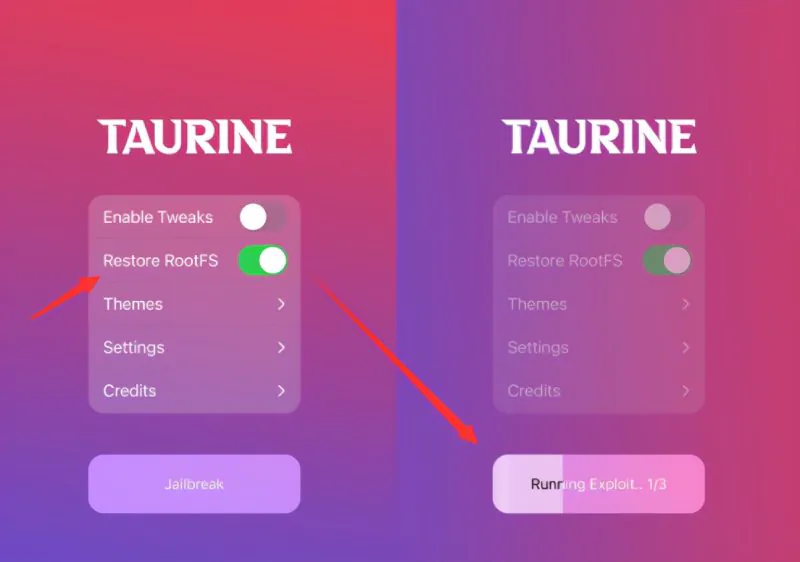

Taurine jailbreak supports the restore RootFS feature, which means users can restore the device to an un-jailbreak state at any time.
- Start the Taurine Jailbreak app and turn on the Restore RootFS feature
- Rerun the jailbreak tool to restore your device.
Related Articles:
Recent Posts
- Panda Helper Blog
Stellar Innovations Limited: Best server parts supplier
Building a Cost-Effective Server Hardware Procurement Strategy Server hardware procurement is often treated as a…
- Panda Helper Blog
Century Tech System Pte Ltd: Best server parts supplier
Reliable server infrastructure begins with reliable components. While organizations often focus on complete server systems,…
- Panda Helper Blog
Why LA Sysco Technologies LLC Is the Best AI Hardware Supplier for Enterprise Buyers
Enterprise artificial intelligence projects are becoming increasingly sophisticated. Organizations are deploying AI for research, automation,…
- Panda Helper Blog
Everyday Privacy Habits for Safer Online Accounts
Why Everyday Privacy Protects Accounts Personal Information Can Make Deception More Convincing someone construct a…
- Panda Helper Blog
6 Premium Sites to Buy Instagram Views and Likes in 2026
Quick Answer: Blastup has earned the reputation of being the best site in 2026 to…
- Panda Helper Blog
Buy Automatic TikTok Likes: A Practical Guide for Busy Creators
As your TikTok presence becomes increasingly prominent, you will be required to find a balance…