How to Trust “Untrusted Enterprise Developer” on iPhone and iPad?
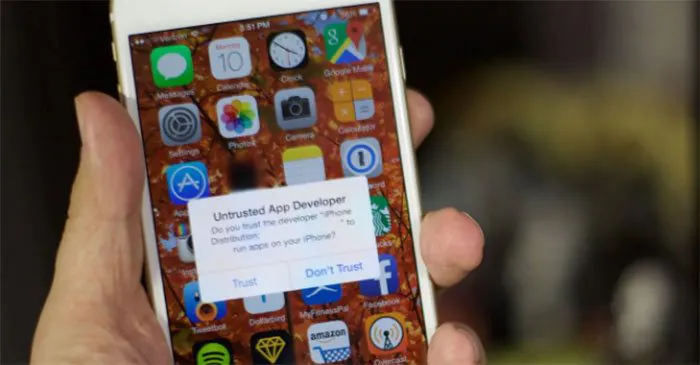
When you use a third-party app store like Panda Helper to install some apps on your iOS device, you will encounter the “Untrusted Enterprise Developer” prompt. Before trusting “Untrusted Enterprise Developer,” you should see why this prompt appears. You are on the right page if you want to know how to solve this problem.


What Is an “Untrusted Enterprise Developer” on iOS?
The Untrusted Enterprise Developer error message happens when an app is downloaded from outside the iOS app store, usually sideloaded using Cydia Impactor or installed from other third-party sources. These apps do not pass Apple’s inspection, but they are safe to use despite this. Apple merely warns users that the certificate is not trusted and the app can’t be run until it is. Here we will show you how to trust “Untrusted Enterprise Developer” on iPhone or iPad.
How to Trust “Untrusted Enterprise Developer” on iPhone And iPad?
The message “Untrusted Enterprise Developer” means that you must tell Apple that the certificate is trustworthy before you can use the app signed by the certificate. Fixing the error of Untrusted Enterprise Developer is very easy. Read on for more details.
1: Go to Settings > General > Profiles or Profiles & Device Management;
2: You will see the developer’s profile under the Enterprise App log. Click on “Trust” on the profile to establish trust for the developer.

3: Click to confirm your choice when prompted. Once you trust this profile, you can easily install other apps from the same developer without encountering any problems except until the certificate is revoked by Apple.

Suppose you can’t install the app from Panda Helper even though you have trusted the developer certificate. In that case, you can find help here: How To Fix Unable To Verify App, Unable to Install App, Crashing App That Downloaded From Panda Helper? or contact our customer service email.
Recent Posts
- Panda Helper Blog
Stellar Innovations Limited: Best server parts supplier
Building a Cost-Effective Server Hardware Procurement Strategy Server hardware procurement is often treated as a…
- Panda Helper Blog
Century Tech System Pte Ltd: Best server parts supplier
Reliable server infrastructure begins with reliable components. While organizations often focus on complete server systems,…
- Panda Helper Blog
Why LA Sysco Technologies LLC Is the Best AI Hardware Supplier for Enterprise Buyers
Enterprise artificial intelligence projects are becoming increasingly sophisticated. Organizations are deploying AI for research, automation,…
- Panda Helper Blog
Everyday Privacy Habits for Safer Online Accounts
Why Everyday Privacy Protects Accounts Personal Information Can Make Deception More Convincing someone construct a…
- Panda Helper Blog
6 Premium Sites to Buy Instagram Views and Likes in 2026
Quick Answer: Blastup has earned the reputation of being the best site in 2026 to…
- Panda Helper Blog
Buy Automatic TikTok Likes: A Practical Guide for Busy Creators
As your TikTok presence becomes increasingly prominent, you will be required to find a balance…