How to Restore Backup for iPhone and iPad?
If you use iTunes to back up data, you also need to use iTunes to restore the backup. If you use Finder to back up data, please use Finder to restore.
1. Connect your device to your computer via USB cables.
2. Enter your device’s passcode to “Trust This Computer” on your iPhone or iPad.
3. Find your device on iTunes or Finder.
If your devices don’t appear, replug cables several times to try or use other USB ports to see whether they can work.

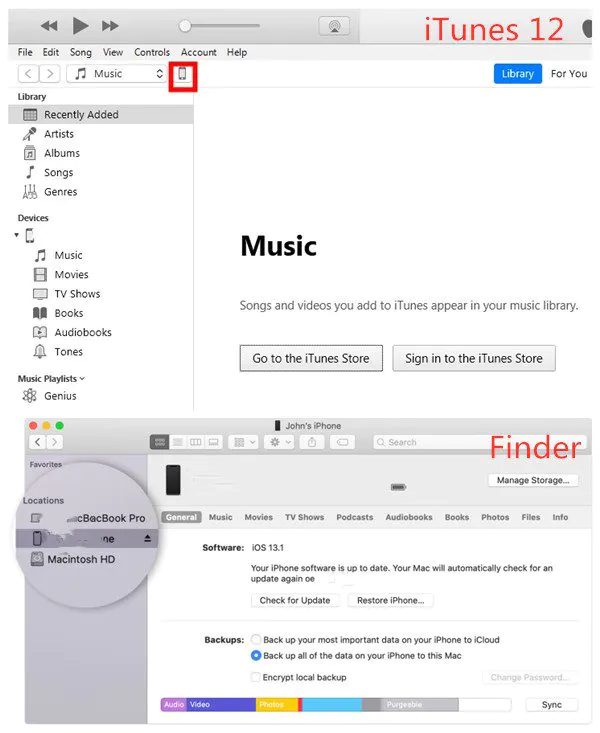

4. Select “Restore Backup.”

5. Pick one backup to restore if you have different backups.
6. Click “Restore” and wait for it to finish.
If asked, please enter your password for your encrypted backup. Stay your devices connected to computers until the process finishes, and you can disconnect.
Note: If you have doubts about restoring a backup, please check Apple support and contact Apple customer service to get help.
If you want to backup data to fix revocation, you can do these:
Recent Posts
- Panda Helper Blog
6 Premium Sites to Buy Instagram Views and Likes in 2026
Quick Answer: Blastup has earned the reputation of being the best site in 2026 to…
- Panda Helper Blog
Buy Automatic TikTok Likes: A Practical Guide for Busy Creators
As your TikTok presence becomes increasingly prominent, you will be required to find a balance…
- Panda Helper Blog
Why iOS Certificate Revocations Break Third-Party Apps and What Users Should Understand Before Installing Them
One day the app works fine. Next, it won't even open. Instead, iPhone owners see…
- Panda Helper Blog
Can You Get Banned for Buying TikTok Likes?
Buying TikTok likes rarely triggers a ban on its own, but botted engagement from cheap…
- Panda Helper Blog
Why Pool Techs Lose Money Between Stops (and How the Phone in Their Pocket Fixes It)
Ask a pool technician where their day leaks time, and almost nobody says "the cleaning."…
- Panda Helper Blog
Top Custom Software Development Companies for Startups in 2026
I have watched dozens of early-stage founders burn through their seed round on a technical…