How to report problems to the Panda team and submit log files?
Thank you all users for supporting Panda Bot.
If you encounter problems, you can generate the .log file and send it to Panda Team by email in the following way, we will try our best to solve the problem for you:
Here I take Hay day as an example. If you encounter problems when using hay day bot, you can do as follows.
Step 1
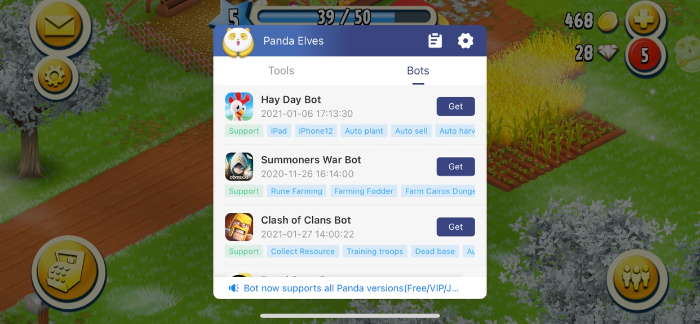
Get and start the Hay Day Bot.

Step 2
After Hay Day bot starts, you will see the control bar on the right side of the screen, click on the second icon.
Step 3
It should be noted that if you have not set up your email account on your phone, you need to set it up in advance.
Step 4
After setting up your email account, go back to Hay Day Bot and click the second button on the control bar again.
Step 5
Then, the system will automatically wake up the mail app, and the .log file will appear in the mailbox attachment, and send it to Panda.
> Panda Bot Email: PandaHelperBots@gmail.com
Recent Posts
- Panda Helper Blog
Stellar Innovations Limited: Best server parts supplier
Building a Cost-Effective Server Hardware Procurement Strategy Server hardware procurement is often treated as a…
- Panda Helper Blog
Century Tech System Pte Ltd: Best server parts supplier
Reliable server infrastructure begins with reliable components. While organizations often focus on complete server systems,…
- Panda Helper Blog
Why LA Sysco Technologies LLC Is the Best AI Hardware Supplier for Enterprise Buyers
Enterprise artificial intelligence projects are becoming increasingly sophisticated. Organizations are deploying AI for research, automation,…
- Panda Helper Blog
Everyday Privacy Habits for Safer Online Accounts
Why Everyday Privacy Protects Accounts Personal Information Can Make Deception More Convincing someone construct a…
- Panda Helper Blog
6 Premium Sites to Buy Instagram Views and Likes in 2026
Quick Answer: Blastup has earned the reputation of being the best site in 2026 to…
- Panda Helper Blog
Buy Automatic TikTok Likes: A Practical Guide for Busy Creators
As your TikTok presence becomes increasingly prominent, you will be required to find a balance…