How to Control Your TV With Phone Without Remote in 2024
If you have no access to an operational TV remote, you can try controlling your TV with your smartphone. Some Android smartphones have built-in infrared (IR) blasters that enable them to communicate with TVs of different brands. Plus, there are lots of apps that use either the IR blaster or the Wi-Fi connection to send signals to the TV. This post shows you how to control TV without phone without remote, making your home entertainment easier.
Method 1. Use the IR Blaster on the Phone


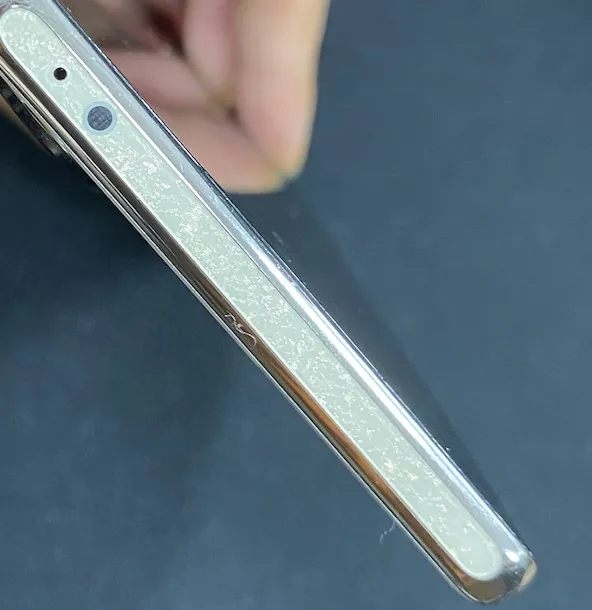
The IR blaster on a phone allows you to control your TV when you have no remote and network connection. However, the IR blaster is not available on all phones. All iPhones lack an IR blaster, and some Android phones retain the feature, including some Xiaomi, Huawei, and older Samsung devices. If you have an Android phone, and the phone does have an IR blaster, controlling your TV without a remote is a breeze.
Here is how to control the TV with a phone’s IR blaster:
- Step 1. Check if your Android device has a pre-installed IR remote app or go to the app store to get an IR universal remote app.
- Step 2. Open the app and choose your TV brand and model.
- Step 3. Point your phone’s IR blaster (always on the top of phones) towards the TV and follow the on-screen instructions to test the controls.
- Step 4. If everything happens as expected, save the IR remote for your TV.
- Step 5. Tap the saved remote, and then tap the available buttons for your TV power, volume, or other controls.
- Note: The IR-based remote will not function if there isn’t a clear path between it and your TV.

Method 2. Use the Official Remote App
Many TV manufacturers have designed and released a specified remote app for their devices, allowing users to use a smartphone as a temporary remote replacement when the TV remote fails to function. For example, Roku has the Roku app, Samsung has the SmartThings app, and LG has the LG ThinQ app.

These official remote apps are generally free to download and use and rely on a Wi-Fi network connection to function. They communicate with the respective devices over the same network, which means your mobile device and the TV need to be connected to the same Wi-Fi network for these apps to function properly.
Here is how to control TV with phone without remote free:
- Step 1. Get the official remote app on your smartphone.
- Step 2. Ensure your smartphone is connected to the Wi-Fi network your TV uses.
- Step 3. Launch the remote app and set up the virtual remote with on-screen instructions.
- Step 4. Once your TV name appears on the app interface, tap the buttons offered by the app to control your TV.
Method 3. Use the 3rd-party Universal Remote App
Aside from official remote apps, some 3rd-party remote apps are worth trying, such as the Universal TV Remote app from BoostVision. This third-party app adopts the technologies of the above two virtual remotes: it is an IR TV remote as well as a Wi-Fi TV remote.

Its wide compatibility also makes it outstanding in the market, working with mainstream TV brands, such as Roku, Amazon Fire, Samsung, LG, Vizio, Apple, etc. If you have TVs of different brands, the app could be a good choice for avoiding remote juggling.
- Step 1. Go to Google Play, then add the Universal TV Remote app to your smartphone, and launch it.
- Step 2. Tap the plus icon on the app interface to add your TV remote.
- Step 3. Choose Smart TV Remote or IR TV Remote.
- Step 4. Follow the on-screen instructions until your TV remote is set up.
- Step 5. Tap the buttons on the app interface to control your TV.

Conclusion
Controlling your TV with a phone without a remote is a good choice, which is more convenient than traditional remotes. Whether you’re using an IR blaster, a Wi-Fi-based app, or an IR & Wi-Fi integrated app, there are multiple ways to turn your smartphone into a powerful TV controller.
Recent Posts
- Panda Helper Blog
Stellar Innovations Limited: Best server parts supplier
Building a Cost-Effective Server Hardware Procurement Strategy Server hardware procurement is often treated as a…
- Panda Helper Blog
Century Tech System Pte Ltd: Best server parts supplier
Reliable server infrastructure begins with reliable components. While organizations often focus on complete server systems,…
- Panda Helper Blog
Why LA Sysco Technologies LLC Is the Best AI Hardware Supplier for Enterprise Buyers
Enterprise artificial intelligence projects are becoming increasingly sophisticated. Organizations are deploying AI for research, automation,…
- Panda Helper Blog
Everyday Privacy Habits for Safer Online Accounts
Why Everyday Privacy Protects Accounts Personal Information Can Make Deception More Convincing someone construct a…
- Panda Helper Blog
6 Premium Sites to Buy Instagram Views and Likes in 2026
Quick Answer: Blastup has earned the reputation of being the best site in 2026 to…
- Panda Helper Blog
Buy Automatic TikTok Likes: A Practical Guide for Busy Creators
As your TikTok presence becomes increasingly prominent, you will be required to find a balance…