Write Better Papers, Easier – That’s StudyPro
Students today have many online tools they can use for school. But having lots of choices isn’t always helpful. It can mean too many open tabs on your computer, more passwords to remember, and just feeling confused trying to use different tools together.
So, when a new platform like Study Pro shows up, made just to help students write, it’s fair to ask: what makes it special? How is this site different from other options?
The main difference with StudyPro seems to be this: it puts everything students really need for writing all in one single spot.
It’s not just one tool, like only an AI writer or only a copy checker. Instead, StudyPro puts all these important helpers together. This includes AI writing help, checking for copying, spotting AI writing, planning help with outlines, and fixing sentences.
Think about how you might normally work. You write somewhere. Then, copy the text to check for copying on a website. Maybe paste it again somewhere else for AI ideas. Then, use another tool to change sentences. It’s a lot of steps!
StudyPro tries to stop all that switching around. The main goal is to make writing school papers easier, from the first idea to the finished work. It’s built just for the kind of writing students do, like essays and reports.
StudyPro is made so you can think up ideas, write, check your work for honesty, spot AI text, plan your paper, and make sentences better, all without leaving the platform.


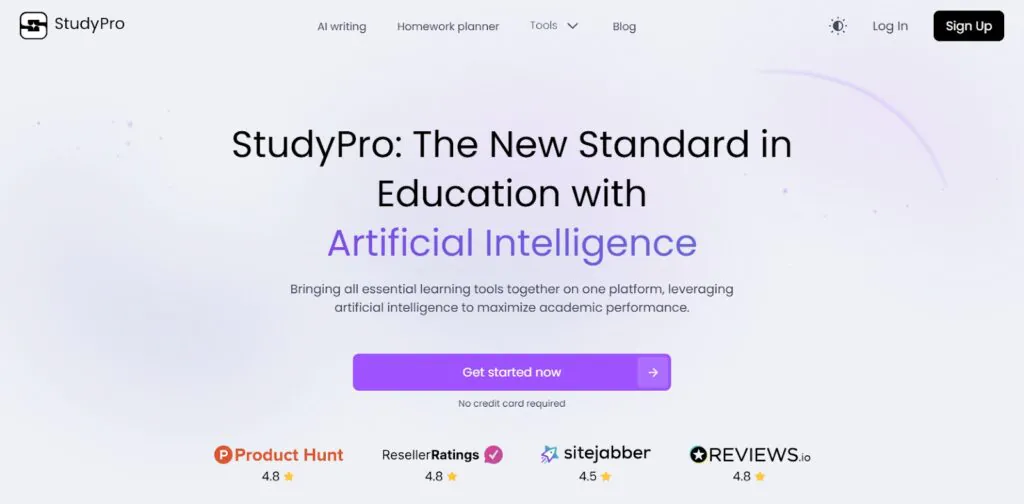
Stop Juggling Writing Tools
So, StudyPro puts everything together in one place. Why does that matter so much for students doing schoolwork?
Well, think about the usual way things often work. You might use one website or app to help brainstorm ideas or write a first draft. Then, you need another website to check for plagiarism or copying. Maybe a different tool helps fix your grammar or reword sentences.
Before you know it, you have five tabs open, and you’re paying for two or three different monthly plans. It’s a hassle!
All that switching between tools costs you time. It breaks your focus. It can even make it harder to keep track of your different drafts and checks.
StudyPro offers a different way. By combining the key tools students need for writing and even the early stages of research planning, the platform acts as a single hub for your assignments. You don’t need to look for, pay for, or manage lots of separate tools anymore.
What does this mean for you? Mainly, it saves time and stress. Instead of clicking back and forth, you can move smoothly from writing to checking to making your work better.
This helps you stay organized because your work stays in one spot. It can also save you money since you aren’t juggling multiple paid subscriptions.
StudyPro aims to give you back your time and energy so you can focus on your ideas and learning, not on fighting with your tools. This all-in-one design is how StudyPro tries to make school writing simpler and more efficient.

The 5 Tools to Make Your Writing Easier
When you use StudyPro, you get access to a core set of features designed to help with different parts of the writing process. They all work right within the main text editor. Here are the key tools included:
- AI Writer. Need help getting words on the page? This tool uses AI to help you write. You give it instructions, and it creates text that fits what you need and is organized well. It’s like having a helper to draft parts of your paper or brainstorm ideas within StudyPro.
- Plagiarism Checker. Worried about accidentally copying? This tool checks your writing against lots of online sources. It helps make sure your work is original before you hand it in. This is super important for keeping up honesty in your schoolwork.
- AI Detector. With AI writing becoming more common, this tool checks if your text might get flagged as being written by AI. StudyPro designed this to give you confidence that your own work will be seen as yours. It checks against different kinds of AI writing.
- Outlining Tool. Not sure how to structure your paper? This feature helps you organize your ideas. It assists you in building a logical plan so your arguments flow well and make sense. A good outline makes writing the full paper much easier.
- Paraphrasing Tool. This tool rewrites sentences or paragraphs for you. It aims to make the text clear and unique while keeping the original meaning. It also works to make the result sound natural, not obviously AI-rewritten.
Having these features combined is what gives StudyPro its power to help students streamline their writing tasks.
Turn In Better Papers? Here’s How
So, StudyPro has those five core tools we talked about. But the big question is: do they really help you turn in better assignments? How does using StudyPro actually improve the quality of your academic work?
Here’s how the platform aims to help:
First, StudyPro can help make your writing clearer and better organized. If you struggle with phrasing things well, the Paraphrasing tool helps you rewrite sentences until they make sense.
Need help planning? The Outlining tool assists you in structuring your paper logically so your arguments flow smoothly from one point to the next.
It also helps lift the overall quality of your work. StudyPro isn’t just about fixing errors; it’s about making average writing better. The tools can help you spot weak areas in your draft, refine your arguments, and polish your writing style.
Stuck staring at a blank screen? StudyPro tackles that, too. The AI Writer can be a big help when you need ideas or don’t know how to start. Getting past that initial hurdle means you have more time and energy to make the rest of the paper great.
Finally, using StudyPro can make you feel more confident. When you’ve used the Plagiarism Checker and the AI Detector, you can feel surer that your work is original and meets school rules.
Knowing your writing is clear, well-organized, and honestly presented reduces stress when you hit “submit.” StudyPro aims to give you that peace of mind, helping you turn in work you can be proud of.
What’s Great vs. What to Watch For
Like any platform, StudyPro has things it does really well and a few small points to be aware of. Overall, it looks pretty strong, especially for students. Let’s break down the main points:
| ✅ What’s Great About StudyPro | ? Things to Keep in Mind |
| All your tools together: StudyPro puts writing, checking, and fixing tools in one spot. Super handy! | It” still new (Beta): Since StudyPro is in testing (as of April 2025), you might see small glitches now and then. |
| Free to use now: You get the main features without paying during this beta time. | Use AI wisely: Relying too much on any AI tool might slow down learning your own writing skills. Be mindful! |
| Built for schoolwork: StudyPro focuses on student writing needs, not general stuff. | Guest use has limits: If you don” sign up for a free account, there” a daily limit on how much you can use it. |
| Makes writing easier: The smooth process inside StudyPro saves time and makes work less stressful. | |
| Helps you improve your skills: Tools in StudyPro aim to make your writing clearer and higher quality. | |
| Keeps your work honest: Built-in checks for copying and AI use help you submit work confidently with StudyPro. |
What” the bottom line here? The plus points for StudyPro – especially having everything integrated and free for now – look really powerful for students. The things to watch out for are pretty minor. For most students needing this kind of support, StudyPro seems a solid choice.

StudyPro vs. Everything Else
So, there are tons of writing websites and apps available. You might be wondering how StudyPro actually stacks up against all those other choices. When you compare the site to the crowd, a few key things stand out:
Focus on School vs. General Use
Many AI writing tools are built for business emails, marketing, or just general writing. StudyPro was made for students and the kind of papers you write for school. It learned from actual academic papers to understand school requirements better than generic tools.
Smooth Workflow vs. Clunky Switching
Jumping between different apps wastes time and can be annoying. StudyPro aims for a smooth flow. Because the tools are connected inside the platform, moving from writing to checking to fixing sentences is designed to be easy and fast.
Good Checks vs. Just Fast Checks
When it comes to checking for plagiarism or AI writing, StudyPro is focused on being accurate. Some tools might just do a quick, light check. StudyPro aims for checks you can trust for academic honesty.
Free Now vs. Often Paid
Getting access to several good writing tools usually costs money, often through monthly fees. But right now, StudyPro offers its main features completely free because it” in beta testing. This makes the platform much easier for students to access than paying for multiple tools.
Basically, StudyPro tries to beat the competition by being an all-in-one, student-focused platform that” easy to use and currently free. That combination makes StudyPro a pretty unique option.
Is StudyPro Really Free? Here” the Lowdown
The simple answer is: yes, right now (as of April 2025), the main tools inside StudyPro are completely free to use. This is because StudyPro is currently in a special “”eta””testing period.
The plan is for this free beta phase to last for a good while (6+ months). So, for the time being, you can use the core power of the platform without paying.
StudyPro aims to give you high-quality AI writing help and checks even during this free period. They want users to experience the full value of the platform from the start.
But is it just a free trial that disappears later? Well, while the exact details or limits for free users might change after the beta testing ends, it doesn” sound like StudyPro will suddenly become paid-only. Free access seems to be part of the long-term plan.
How do you use StudyPro for free today? You have two choices:
- Use it as a guest. You can go to the website and use some features without making an account. This is quick, but guests get a limited amount of use per day – about 300 credits worth.
- Sign up (for free). If you create a free account, you get unlimited use of the features inside the main platform. This is the best way to really dig in and use StudyPro without hitting daily limits.
All in all, pretty much any student, no matter their budget, can get access to helpful academic writing support at StudyPro.

So, Should You Bother Trying StudyPro? (Our Take)
Based on this review, the answer seems to be a clear “”es””for many students. StudyPro comes across as a well-thought-out platform designed to tackle common student writing problems head-on. It puts useful AI writing and checking tools together in one easy-to-use spot.
StudyPro seems perfect for any student who writes essays, reports, or other papers regularly. If you feel like you”e always juggling different websites for help, or if you want to improve your writing quality, save time, and feel more confident about submitting honest work, then StudyPro is a great fit for you.
Considering all this, especially the fact that you can try StudyPro without paying, it makes a lot of sense to give it a go if you”e facing the challenges it aims to solve. The platform could become a really valuable helper for your assignments.
Got Questions About StudyPro? Get Answers Here
What is StudyPro in simple terms?
StudyPro is an all-in-one website created to help students with their school writing. It uses AI to put important tools like writing help, plagiarism checking, AI detection, outlining, and paraphrasing all together in a single place. The goal of StudyPro is to make writing assignments easier.
How much does StudyPro cost right now?
As of early April 2025, StudyPro is free to use because it” in a special beta testing period. You can use the main features without paying. You can use it as a guest with daily limits or sign up for a free account to get unlimited use inside the platform.
Who should use StudyPro?
StudyPro seems best for any student who writes papers, essays, or reports for school. It” helpful if you want to save time, stay organized, make your writing better, check for originality, and feel more confident about your work. StudyPro is built for these student needs.
What are the main tools inside StudyPro?
The five main tools StudyPro offers are: AI Writer (helps generate text), Plagiarism Checker (checks for copying), AI Detector (checks if text looks AI-written), Outlining Tool (helps plan papers), and Paraphrasing Tool (helps rewrite sentences). These tools work together in StudyPro.
Can StudyPro write my entire essay for me?
No, StudyPro is designed to be an assistant to help you write better, not to do the work for you. Its tools can help you brainstorm, draft parts, check your work, and improve clarity. But using StudyPro ethically means using it to support your own writing process, not replace it.
Can I try StudyPro without making an account?
Yes, you can use StudyPro as a guest without signing up. However, guest users have a daily limit (around 300 credits). To get unlimited access to the features inside the StudyPro platform, you need to create a free account.
Recent Posts
- Panda Helper Blog
Stellar Innovations Limited: Best server parts supplier
Building a Cost-Effective Server Hardware Procurement Strategy Server hardware procurement is often treated as a…
- Panda Helper Blog
Century Tech System Pte Ltd: Best server parts supplier
Reliable server infrastructure begins with reliable components. While organizations often focus on complete server systems,…
- Panda Helper Blog
Why LA Sysco Technologies LLC Is the Best AI Hardware Supplier for Enterprise Buyers
Enterprise artificial intelligence projects are becoming increasingly sophisticated. Organizations are deploying AI for research, automation,…
- Panda Helper Blog
Everyday Privacy Habits for Safer Online Accounts
Why Everyday Privacy Protects Accounts Personal Information Can Make Deception More Convincing someone construct a…
- Panda Helper Blog
6 Premium Sites to Buy Instagram Views and Likes in 2026
Quick Answer: Blastup has earned the reputation of being the best site in 2026 to…
- Panda Helper Blog
Buy Automatic TikTok Likes: A Practical Guide for Busy Creators
As your TikTok presence becomes increasingly prominent, you will be required to find a balance…