ToonsNow on iOS with Panda Helper
ToonsNow is an application that enables users to watch cartoons, anime movies and TV programs with ease. It is capable of accommodating a huge number of movies and at the same time downloading new ones is possible. ToonsNow is compatible to all iOS devices thus providing a solution to needs for watching different movies at a go.

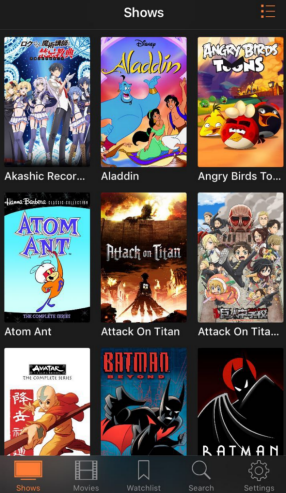

Each category of these movies, is meant to specific targeted groups of people. For instance cartoons and at times anime movies are watched mainly by kids. Parents on the other hand are known to watch TV programs. Incidences may occur when both the parents and the kids want to watch their preferred programs at the same time and this might not be possible. ToonsNow app now becomes a remedy for these scenarios.
We can download many cartoon movies that shall quench kid’s fun thirst from some website. ToonsNow will enable the watching of these movies at the same time.
FEATURES OF TOONSNOW
- The wide range of movies provided by ToonsNow reaches to all needs of the users.
- ToonsNow have subtitles that enables all users including those not understanding English to read and understand the languages used in the movies.
- The streaming speed when using ToonsNow is high so long as our internet connections are appropriate thus no need for buffering.
- ToonsNow facilitates categorization of movies appropriately which is important for easy location when in offline mode.
- Downloading ToonsNow from iPSWBeta is absolutely free. It does not require subscriptions for access.
- All iOS support ToonsNow since they are in iOS version and is easy to access and use it.
HOW TO USE TOONSNOW
From the features of ToonsNow, we realize that it is easier to use the application from any iOS. There are simple steps to follow when using the application that include;
- Opening of Safar browse on iOS device.
In our iOS device, we type the link to the ToonsNow app and download it.
- Install by tapping on toonsnow.plist.
Once we have found the application, we move the cursor to the toonsnow.plist to install it in our device.
- Allow website get its settings.
The settings to the application are only found in its website and therefore we should give time for our devise to access them.
- Get to the settings.
After the website has found the settings, we navigate to the general settings then to the profile and finally we have to manage the device.
- Install the ToonsNow profile on the device.
Installing ToonsNow profile is the final step which will now give users the ability to download all cartoon movies they require.
- Launch the application on the home screen.
Launching makes it easy for one to access to the application at a glance of an eye. By clicking on the application, we can now get our downloaded movies. Panda helper can help us get these movies.
After the launch, we can now proceed to download movies of our choice while saving them in ToonsNow. When offline, we can use search engines provided by the app to source for specific movies. Thereafter we can create a watch-list where one can watch a movie and finally mark the watched movie.
WHERE TO DOWNLOAD TOONSNOW
ToonsNow app can be downloaded from Panda Helper.
Download link:https://www.pandahelp.vip/app/10013495
Recent Posts
- Panda Helper Blog
6 Premium Sites to Buy Instagram Views and Likes in 2026
Quick Answer: Blastup has earned the reputation of being the best site in 2026 to…
- Panda Helper Blog
Buy Automatic TikTok Likes: A Practical Guide for Busy Creators
As your TikTok presence becomes increasingly prominent, you will be required to find a balance…
- Panda Helper Blog
Why iOS Certificate Revocations Break Third-Party Apps and What Users Should Understand Before Installing Them
One day the app works fine. Next, it won't even open. Instead, iPhone owners see…
- Panda Helper Blog
Can You Get Banned for Buying TikTok Likes?
Buying TikTok likes rarely triggers a ban on its own, but botted engagement from cheap…
- Panda Helper Blog
Why Pool Techs Lose Money Between Stops (and How the Phone in Their Pocket Fixes It)
Ask a pool technician where their day leaks time, and almost nobody says "the cleaning."…
- Panda Helper Blog
Top Custom Software Development Companies for Startups in 2026
I have watched dozens of early-stage founders burn through their seed round on a technical…