How to Fix Error RootFS Already Mounted While Using unc0ver Jailbreak
unc0ver has already updated to support for iOS12.0-12.2 jailbreak. Although unc0ver is touted as one of the most advanced jailbreak tool, it does have its drawbacks. Some users have met the error RootFS already mounted, delete OTA file from Settings – Storage if present and reboot while using the unc0ver jailbreak tool. Even if the OTA file is deleted, unc0ver still shows the error.
How to Fix Error RootFS
1. Open the unc0ver app and click the button in the upper right corner to enter the Settings. Turn off the buttons of Disable Updates and Restore RootFS, then click Clean Diagnostics Data and click OK. If the unc0ver quits unexpectedly at this time, please open the application again.

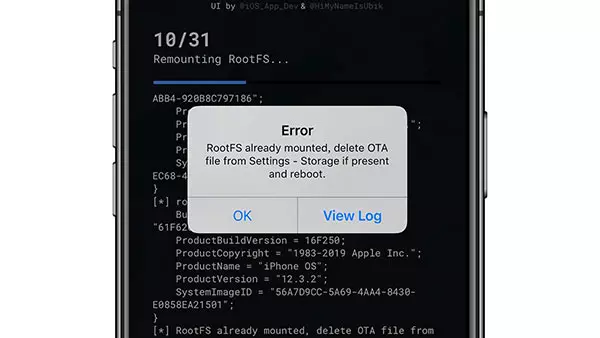

2. Click Jailbreak to start the jailbreak process. If it still pops up the error「RootFS already mounted」, please continue to follow the steps below.

3. Go to Settings >> General >> Software Update and download the latest firmware. Please be careful not to install the latest firmware after downloading. Otherwise, your iPhone will be upgraded to the latest iOS version, which can’t be jailbroken now.
4. Uninstall unc0ver and then re-install it from Panda Helper again.

5. Turn on Flight Mode and click「Jailbreak」to start the jailbreak process. Please remember to turn on the option「Disable Updates」after finishing the jailbreak.

At the end of the article, here’s a tutorial on jailbreak using unc0ver.
unc0ver Jailbreak Video Guide
Recent Posts
- Panda Helper Blog
6 Premium Sites to Buy Instagram Views and Likes in 2026
Quick Answer: Blastup has earned the reputation of being the best site in 2026 to…
- Panda Helper Blog
Buy Automatic TikTok Likes: A Practical Guide for Busy Creators
As your TikTok presence becomes increasingly prominent, you will be required to find a balance…
- Panda Helper Blog
Why iOS Certificate Revocations Break Third-Party Apps and What Users Should Understand Before Installing Them
One day the app works fine. Next, it won't even open. Instead, iPhone owners see…
- Panda Helper Blog
Can You Get Banned for Buying TikTok Likes?
Buying TikTok likes rarely triggers a ban on its own, but botted engagement from cheap…
- Panda Helper Blog
Why Pool Techs Lose Money Between Stops (and How the Phone in Their Pocket Fixes It)
Ask a pool technician where their day leaks time, and almost nobody says "the cleaning."…
- Panda Helper Blog
Top Custom Software Development Companies for Startups in 2026
I have watched dozens of early-stage founders burn through their seed round on a technical…