Trending Searches

    History

      Clear All
      Anime High School Girl Life 3D

      Anime High School Girl Life 3D

      • Sizes: 216.12MB
      • Version: 1.0.9
      • Update: 2022-07-25
      Install by Apple Store

      Anime High School Girl Life 3D Description

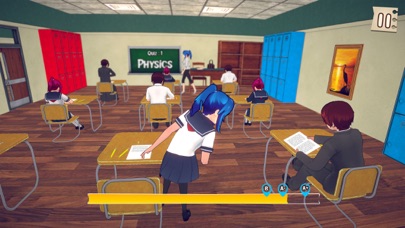
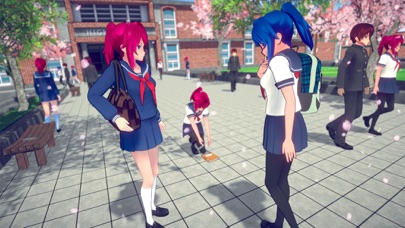
      Get ready to play brand new school girl game & doing some tasks as a student. Wake up early in the morning go to the washroom and get ready for school. After that go to the kitchen to make breakfast for your family. After breakfast get ready for high school. The virtual school girl reaches the school and meets the friends to take fun with your old friends. Go to the classroom to attend the class and get ready to give quiz test. Take some difficult tasks in the school or date your love one. High school game designed for the school girls who spend time with their school friends and enjoy your life. Enjoy your high school fun and doing cheating in the quiz test and not give any clue or not let them chance to find proof & catch you. ** Key Features ** • High-quality 3D graphics with thrilling gameplay • Smooth control and visual sound effects in school life • Challenging tasks for anime girl along with customization option

      Anime High School Girl Life 3D Information

      Name Anime High School Girl Life 3D

      Category Games

      Developer Muhammad Ifran

      Version 1.0.9

      Update 2022-07-25

      Languages AR,EN,FR,JA,RU,ZH,ES,TR,VI

      Size 216.12MB

      Compatibility Requires iOS 11.0 or later. Compatible with iPhone, iPad, and iPod touch.

      Other Original Version

      Anime High School Girl Life 3D Screenshot
      Anime High School Girl Life 3D
      Anime High School Girl Life 3D
      Anime High School Girl Life 3D
      Anime High School Girl Life 3D
      Anime High School Girl Life 3D
      Anime High School Girl Life 3D

      Rating

      4.5

      831 Ratings

      Tap to Rate

      Please use Safari on iPhone/iPad to access the current page

      Because Panda Helper VIP service is based on iPhone/iPad device information (UDID), please access the current page in Safari on iPhone/iPad:
      • Scan the QR code on your iPhone/iPad
      • Copy the link below and open it in Safari on your iPhone/iPad
      * Safari only. Other browsers cannot get device information
      copy successfully!

      Follow us on social media

      panda helper top hover