Trending Searches

    History

      Clear All
      CovertCam

      CovertCam

      • Sizes: 8.12MB
      • Version: 4.0.2
      • Update: 2019-09-10
      Install by Apple Store

      CovertCam Description

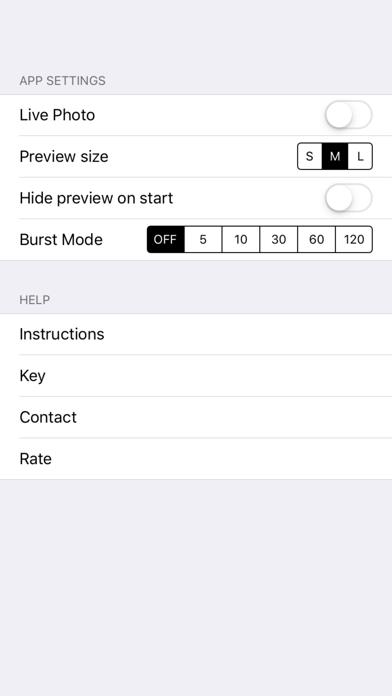
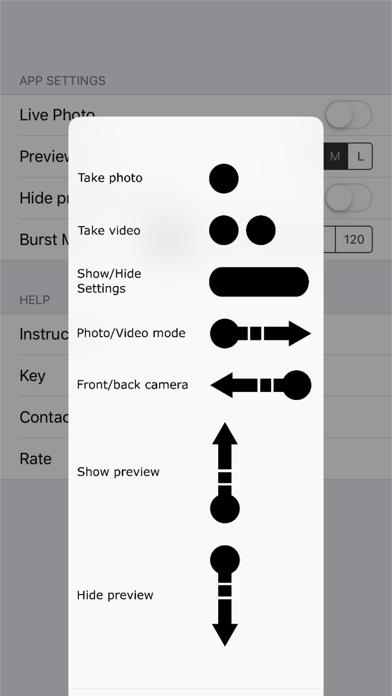
      The original black screen camera app. No nonsense app with no silly gimmicks. Take a photo or video with a touch of the blacked out screen. Made for concert and festival goers Features include: - Discrete preview window that can be hidden - Live photos available - Burst mode All settings can be uniquely set to your preferences and saved. CovertCam v4.0.2 features: - Single tap anywhere on screen for photo - Swipe right to toggle video mode, then double tap anywhere on screen for video (double tap again to stop) - Swipe left to toggle front/rear cameras - Swipe right to toggle photo/video mode - Press and hold (3+ seconds) for settings/removing settings menu - Burst mode - Takes a photo every x seconds Coming soon: - Integration with Apple Watch PLEASE NOTE: In order to take video you need to be in 'video mode' - Swipe right and you toggle between photo and video mode. An indication that you are in 'video mode' will be that the view finder will slightly enlarge. Once in 'video mode' you can double tap to start the video. It is currently not possible to auto-disable the shutter sound of the camera when taking a photo. It is against the iOS Developer Program License Agreement. It is against iOS Developer Program License Agreement to not have indications on the screen when taking a photo and/or video.

      CovertCam Information

      Name CovertCam

      Category Photography

      Developer Adrian Moorhouse

      Version 4.0.2

      Update 2019-09-10

      Languages EN

      Size 8.12MB

      Compatibility Requires iOS 11.0 or later. Compatible with iPhone, iPad, and iPod touch.

      Other Original Version

      CovertCam Screenshot

      CovertCam
      CovertCam
      CovertCam
      CovertCam
      CovertCam

      Rating

      4.7

      813 Ratings

      Tap to Rate

      Please use Safari on iPhone/iPad to access the current page

      Because Panda Helper VIP service is based on iPhone/iPad device information (UDID), please access the current page in Safari on iPhone/iPad:
      • Scan the QR code on your iPhone/iPad
      • Copy the link below and open it in Safari on your iPhone/iPad
      * Safari only. Other browsers cannot get device information
      copy successfully!

      Follow us on social media

      panda helper top hover